
How to Write MAGI-2 Prompts for 4–30 Second Videos
Strong text-to-video prompts are not about stuffing adjectives — they tell the model who moves, when they move, how the camera travels, and what the scene sounds like. Built around MAGI-2’s 4–30 second, 1080p, 25 fps native audio pipeline, this guide gives you copy-ready templates you can test immediately.
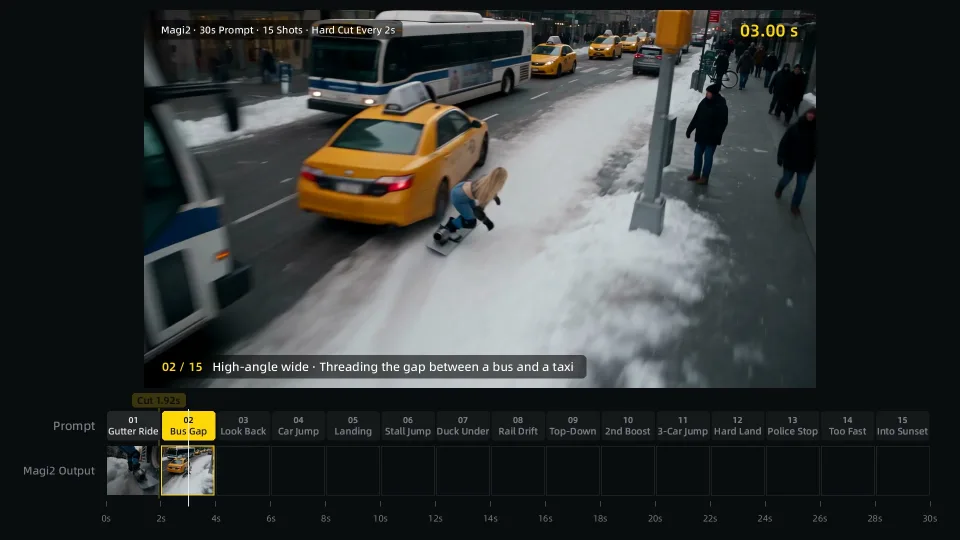
1. Why short descriptions work for 4s clips, while 15–30s needs beat order
For a 4-second establishing shot, a single action plus one camera move is enough. Once you extend to 15–30 seconds on MAGI-2, leaving pacing vague causes the camera to drift or repeat the same gesture.
Break longer generations into 2–4 chronological beats (Opening → Mid-action → Closing reveal) so temporal motion stays grounded across the entire clip.
2. The 6-part repeatable prompt structure
Keep prompts modular so you can iterate on one variable at a time without breaking the rest of the scene:
- Subject: Who or what anchors the frame, including wardrobe, material, and posture.
- Environment: Concrete place, weather, time of day, and foreground/background depth.
- Action & timing: One primary motion per beat using plain verbs.
- Camera & lens: Shot size (close-up, medium, wide) + movement (slow dolly in, crane rise, handheld tracking).
- Lighting & color: Natural overcast, warm paper lanterns, golden hour rim light, or high-contrast studio key.
- Native audio: Spoken dialogue, foley footsteps, rain on asphalt, or quiet ambient room tone (or specify silent when you plan to score later).
3. Copy-ready 5s and 30s MAGI-2 prompt templates
Paste either structure directly into the magi2.info Text to Video workbench and swap the bracketed subject for your own scene:
Medium tracking shot following a ceramicist shaping wet clay on a spinning wheel inside a sunlit studio. Warm afternoon window light catches fine water droplets. Slow dolly-in toward her hands. Subtle audio of wet clay friction and quiet studio ambiance. 1080p, 25fps, natural 35mm lens.
Beat 1 (0–10s): Wide establishing crane shot descending over a rain-slick coastal train platform at dusk, misty ocean horizon behind glowing station lamps. Beat 2 (10–20s): Cut to medium side-tracking shot of a traveler in a wool coat stepping onto the wet tiles as a commuter train glides in from left to right. Beat 3 (20–30s): Close-up as sliding doors open, warm cabin light spilling onto the rain-streaked glass, distant train brakes and light rainfall audio.
4. Common prompt mistakes to avoid
Most broken generations trace back to three easily fixed habits:
- Stacking five conflicting actions in a 4-second clip — keep one clear motion per 4–6 seconds.
- Mismatched aspect ratio — vertical 9:16 social hooks need centered vertical framing, not sweeping horizontal landscapes.
- Contradictory camera commands (e.g., "locked tripod" and "fast FPV drone orbit" in the same sentence).
Frequently Asked Questions
How long can a MAGI-2 prompt be?
Sand AI’s official platform documentation specifies up to 15,000 characters for detailed scripts, though 60–250 words structured by beats is the sweet spot for most 4–30 second videos.
Should I include audio instructions in every prompt?
Only when you want synchronized dialogue, foley, or ambient sound. MAGI-2 supports native audio generation and also lets you turn sound off if you plan to mix audio in post.
Jump straight into the workbench with 4-30s 1080p and six aspect ratios.
More MAGI-2 Guides
Keep characters, logos, and product geometry consistent in MAGI-2 image-to-video workflows using clean first frames, multi-reference inputs, and disciplined camera motion.
ComparisonMAGI-2 vs Seedance: Side-by-Side Specs, Workflow & When to Pick EachAn objective, dated comparison of Sand.ai MAGI-2 (480B, 4–30s 1080p native audio) vs Seedance / Jimeng across duration, multi-reference control, pricing, and creator workflows.
Use Cases & AdsHow to Make Product Video Ads & Short-Form Commercials with MAGI-2Turn static product photography into 9:16 TikTok/Reels hooks and 16:9 hero commercials with MAGI-2’s six aspect ratios, native foley audio, and image-to-video control.